Todoist is the ultimate app to manage your tasks. I’ve been using it since 2017, applying the Getting Things Done (GTD) methodology.
I praise Todoist mainly for:
- autocompletion with integrated keywords
- cross-platform availability (I can even use it on my smartwatch)
- simplicity (offer of just the right features)
Projects
Section titled “Projects”To start with, you should organise your tasks into different projects. Trust me; you don’t want to keep all of them in the “Inbox”, same as all the e-mails that you would later like to find in the categorised folders. Whenever you write down a task, use # sign, and you will be able to remember about buying milk by assigning it into “Shopping” project.
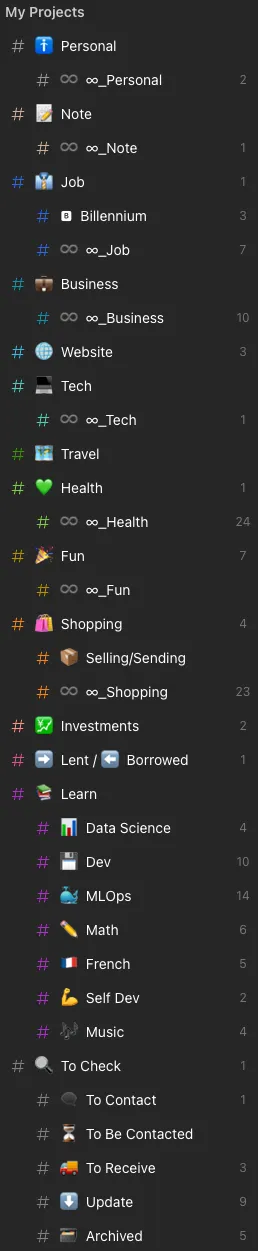
- 🚹 Personal – store of all the personal duties, such as feeding my cat at 8 am
- ♾️ ∞_Personal – recurring tasks from the Personal category, such as doing my laundry each Saturday morning :|
- 📝 Note – quick notes to jot down in Obsidian and process later
- ♾️ ∞_Note – recurring notes in Obsidian
- 👔 Job – everything related to my professional work, interviews etc.
- 🅱️ Billennium – tasks dealing with my employer (Billennium)
- ♾️ ∞_Job – recurring tasks from the Job category
- 💼 Business – tasks related to my own company
- ♾️ ∞_Business – recurring tasks from the business category
- 🌐 Website – things to do on my blog, such as publishing this blog post
- 💻 Tech – work to be done on my technical devices, such as contributing to an open-source project
- ♾️ ∞_Tech – recurring tasks from the Tech category
- 🗺️ Travel – let’s go for an adventure!
- 💚 Health – don’t forget to drink more water!
- ♾️ ∞_Health – recurring tasks from the Health category, such as weekly running sessions
- 🎉 Fun – what would be life without dancing like crazy once in a while?!
- ♾️ ∞_Fun – recurring tasks from the Fun category, such as watching new episodes of Mr. Robot
- 🛍️ Shopping – it’s the 3rd day since I forgot to buy some milk
- 📦 Selling/Sending – would you like to buy my old printers?
- ♾️ ∞_Shopping – this time I’ll not forget to recharge my seasonal train ticket
- 💹 Investments – tracking investment-related tasks
- ➡️ Lent / ⬅️ Borrowed – do you remember about the 50 cents I lent you back in 2010 for the lollipop?
- 📚 Learn – learning materials to go through (mainly online courses)
- 📊 Data Science – time to watch some Andrew Ng
- 💾 Dev – why is this JavaScript always so unpredictable?!
- 🐳 MLOps – let’s set up some containers and orchestrate them!
- ✏️ Math – damn that calculus!
- 🇫🇷 French – il est temps d’améliorer mon français
- 💪 Self Dev – come to me my dear soft skills
- 🎶 Music – my piano can’t just stay there and collect dust
- 🔍 To Check – this project replaces the popular Pocket application. All the videos of cats that I have to watch in my free time
- 💬 To Contact – I can’t forget to call my dentist in the morning
- ⌛ To Be Contacted – yes, I will perfectly remember that it’s the 4th day since you didn’t reply
- 🚚 To Receive – my delivery is late, as always…
- ⬇️ Update – links to websites that post some critical updates, such as leaks of new Skrillex tracks
- 🗃️ Archived – completed or inactive projects kept for reference
Labels
Section titled “Labels”You can treat labels as hashtags. It’s some additional option to categorise your tasks, and sometimes it’s pretty useful. In order to assign some tags to the activity, type @ sign, and you will be reminded of your labels.

- doing – implement the “Personal Kanban” method to mark tasks in three categories: to do, doing and done
- rr – recurring task
- maybe – should I, or should I not?
- no_date – there is no particular deadline for this task
- incompletable – a task that can never be fully completed (e.g. ongoing habits)
- deep_work – objectives requiring a great focus, unlike typical shallow work activities
- music – la la la
- afk – Away From Keyboard. Anything that doesn’t involve my fingers on the keyboard / smartphone screen
- android – task related to my Android phone
- macOS – task related to my Mac
- windows – task related to my Windows machine
- obsidian – task related to my Obsidian vault
- GCal – tag automatically assigned by Google Calendar app, during the process of syncing with my calendar
- platforms assigned to the tasks within my 📚 Learn project
- /AWS
- /Coursera
- /DataCamp
- /O’Reilly
- /Udemy
- /YouTube
- /other_platform
- time estimations for tasks
- .1m – 1 minute
- .5m – 5 minutes
- .10m – 10 minutes
- .15m – 15 minutes
- .30m – 30 minutes
- .1h – 1 hour
- .2h – 2 hours
- .3h – 3 hours
- .4h – 4 hours
- .1d – 1 day
- .long – longer than a day
Priorities
Section titled “Priorities”There is no such thing as ‘I do not have the time’. This is all just a matter of priorities.
— Maciej Aniserowicz
Type p followed with a number “1,2,3 or 4” to prioritise your goals.
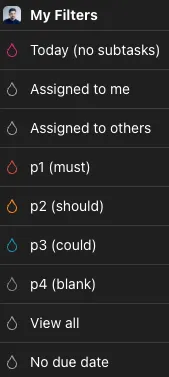
- p1 (must) – very important, I can’t go to bed without marking it as done
- p2 (should) – quite important, but I can survive without doing it
- p3 (could) – it would be great to do it
- p4 (blank) – meehhh… just a regular task.